Welcome back in the past Blog , we talked about HTML attributes. Now We are going to cover something call text formatting. That will allow us to define special elements for our written text in an element. For example <b> will be used if you want to bold letters, in other hand if you want italic you want to use <i>.


List of text formatting elements :
| <b> | Defines bold text |
| <em> | Defines emphasized text |
| <i> | Defines italic text |
| <small> | Defines smaller text |
| <strong> | Defines important text |
| <sub> | Defines subscripted text |
| <sup> | Defines superscripted text |
| <ins> | Defines inserted text |
| <del> | Defines deleted text |
| <mark> | Defines marked/highlighted text |

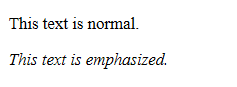
even if <em> displays the same in browsers as <i> , there’s still a difference in the meaning behind them . the tag < em > is to give/ used to signalized that a text is important
When to use <small > tag ?
When you want to make your text smaller, you can do this inside a paragraph .


Hey ! but I want to show off the effect in my text of being deleted how do we do this ?
say no more , my dear reader for your desires I give you the <del> tag.


Now I know what you ‘ re thinking you want to highlight important text elements, that will allow you to catch the attention of your readers when they are in you awesome website .
I give you the <mark> tag that will allow us to highlight


There’s a few more try to play around with them , get comfortable and you will be able to obtain more control over you text, and display the way that you personally want it to be displayed
Citation : https://www.w3schools.com/html/ , vhttp://www.simplehtmlguide.com/text.php , https://www.tutorialrepublic.com/html-tutorial/html-text-formatting.php
 Space Coding